Features
Everything in the free plugin
A speed check you can read, fixes you can trust, and a way back for every change.
The check
Google PageSpeed, in plain English
Mobile and desktop scores
Click Check page speed and Google PageSpeed Insights tests your homepage as a phone and as a desktop computer. Both scores are coloured the way Google colours them: red for very slow, yellow for slow, green for fast.
Problems, biggest first
Each problem says what it costs (time or size) and which fix solves it. Problems the plugin can fix show Fix this; the others show Get expert help.
What this means
After each check, a short note written by AI says what slows the site most and what to do first, and each problem gets a Why it matters line. If the explanation service is not available, the plugin shows its own built-in texts.
Core Web Vitals
Largest Contentful Paint, Total Blocking Time, Cumulative Layout Shift, First Contentful Paint and Speed Index for phones and computers, plus real-visitor data from Chrome when Google has it.
Your site setup
Page builder, theme, cache and image plugins, WooCommerce, WordPress and PHP versions, at a glance.
Protected pages
Booking, payment, checkout, cart and form pages are found automatically. They are never optimized, and they are tested after every fix. You can add your own pages to test.
History and weekly check
A history of your recent checks. Switch on the weekly check and the plugin tests your homepage once a week and emails you when the mobile score drops by 10 points or more.
12 one-click fixes
What each fix does
Fixes change how pages are sent to visitors. They never edit your posts, theme files, original images or other plugins' files.
- ImagesConvert images to WebPSaves a smaller WebP copy next to each JPEG and PNG and sends it to browsers that can show it. Originals are never changed.
- ImagesResize images to the size shownMakes WordPress offer smaller versions of images that show smaller than their file, so phones download less.
- ImagesAdd missing image width and heightAdds the size to images that have none, so the page stops jumping while it loads.
- ImagesLazy-load images further down the pageImages below the first screen load only when a visitor scrolls near them.
- ImagesLoad the top image firstTells the browser to fetch the biggest image at the top of the page before anything else.
- FontsLoad only the font weights in useAsks Google Fonts only for the weights and styles your pages use, and shows text while fonts load.
- FontsHost Google Fonts on your siteCopies the Google Fonts your homepage uses to your own site, so browsers don't have to connect to Google first.
- ScriptsStart tracking scripts after the first scroll or tapAnalytics and ad scripts start when the visitor first interacts with the page, or after a few seconds.
- ScriptsLoad plugin scripts only on pages that use themForm and add-on scripts load only on the pages where the form or widget is.
- EmbedsLoad Google Maps on clickAn embedded map shows a "Show map" button and loads when a visitor clicks it.
- ElementorSwitch on Elementor's speed settingsSwitches on Elementor's own performance settings. Only when Elementor is active.
- CachingPage cacheKeeps a ready copy of each page for visitors who are not logged in. Only when no other page cache plugin is active.
Safety
A way back for every change
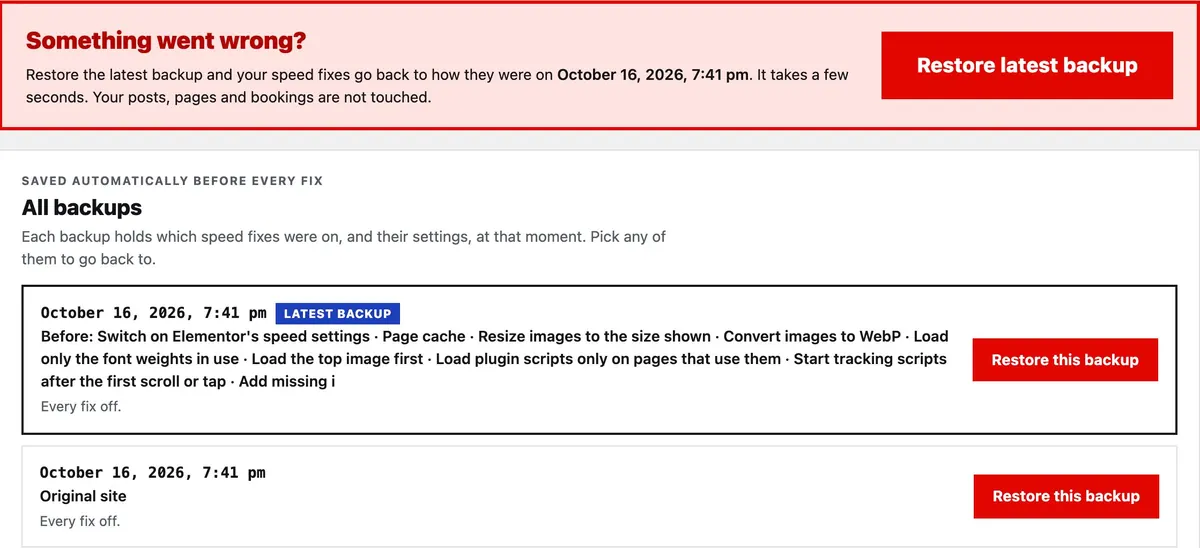
Backup before every fix
Every fix, undo and restore saves a backup first: which fixes were on and their settings.
Tested after every fix
The plugin loads your homepage, your protected pages and any pages you chose, the way a visitor would.
Undone automatically
If a page stops loading, shows an error, or loses a form or booking widget, the fix is switched off at once.
Restore original site
The first backup, "Original site", has every fix off and is never deleted. Restore it and your site is back to how it was before GreenScore WP.
Something broke?
A "Restore the last backup" link sits at the top of every tab and works even if the page's buttons do not. A safe-mode line in wp-config.php switches every fix off for visitors without the dashboard.
Compatibility
Works with what you already use
Elementor
Elementor's speed settings in one click. Logged-in editors see pages without fixes, so the builder always works on the original.
WooCommerce
Cart, checkout and account pages are protected: never optimized, never cached, tested after every fix.
Cache plugins
Works alongside your cache plugin. If another page cache is active, the plugin detects it and its own page cache stays off.
Beyond one-click fixes
Get expert help for the rest
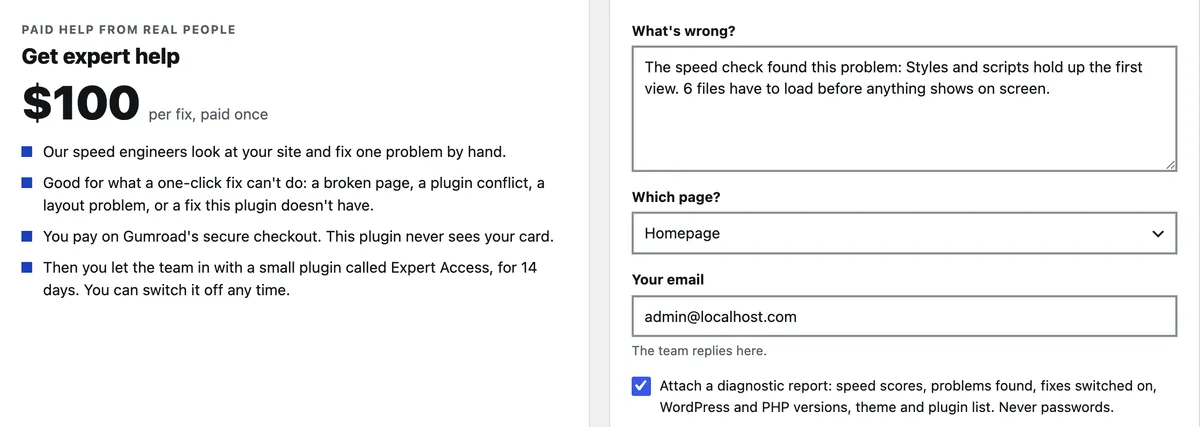
Some problems need a person: unused styles, render-blocking scripts, chat widgets, YouTube embeds, a broken layout or a plugin conflict. The plugin shows Get expert help for them, with the problem already filled in.
See Expert Fix · $100