Free WordPress plugin
Find what slows your site. Fix it safely.
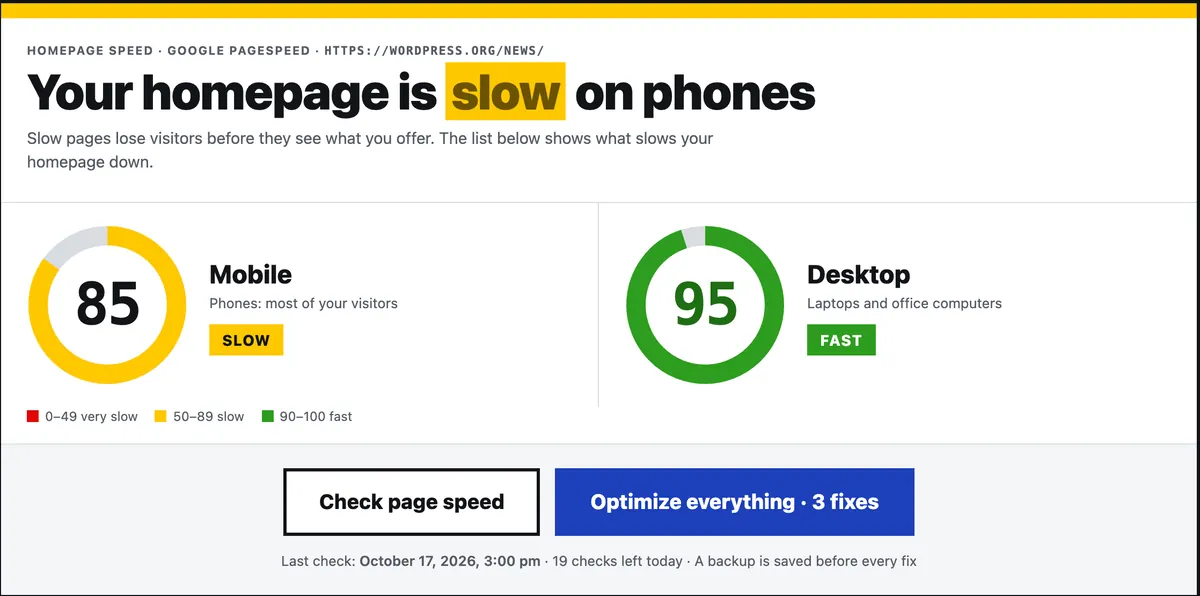
GreenScore WP checks your homepage with Google PageSpeed on phones and computers, explains every problem in plain English, and fixes the common ones in one click. Every fix saves a backup first and is undone automatically if a page breaks.
How it works
Three steps, all inside WordPress
Check
Click Check page speed. Google PageSpeed tests your homepage as a phone and as a desktop computer. It takes about 30 seconds.
Understand
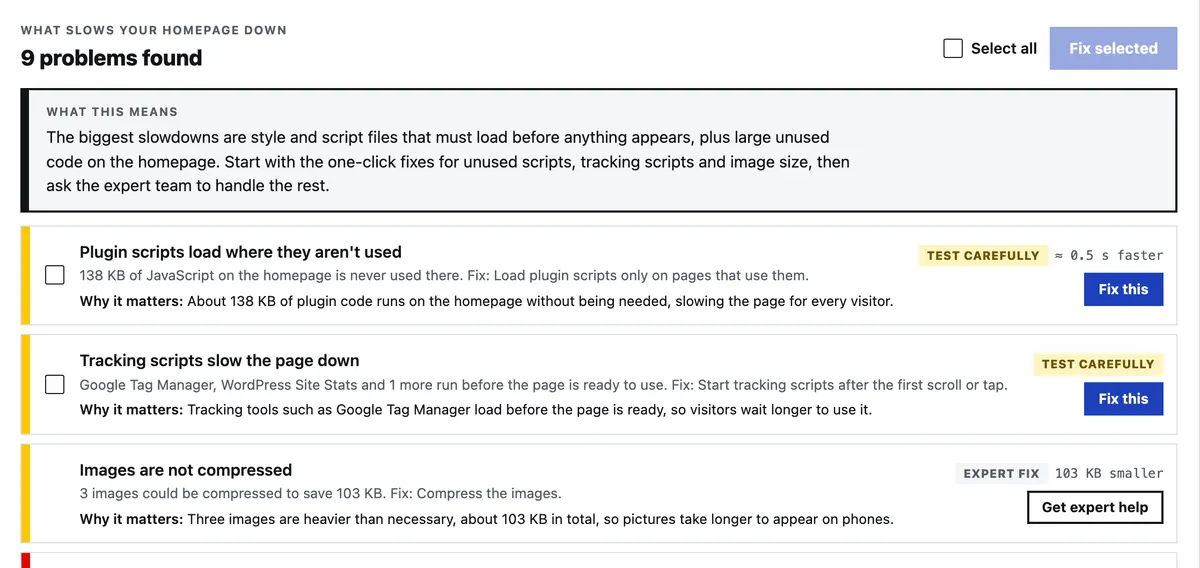
See both scores, the Core Web Vitals and the problems, biggest first. A short What this means note says what slows the site most and what to do first.
Fix
Fix one problem, a few, or everything at once. A backup is saved first, your pages are tested after each fix, and anything that breaks a page is undone.
Safe by design
Every fix is tested on your own pages
Speed plugins are scary when one wrong switch breaks a checkout. GreenScore WP is built around that fear.
- Backup first. Before every fix, undo and restore, the plugin saves a backup of which fixes were on and how.
- Tested like a visitor. After each fix it loads your homepage and your protected pages: booking, checkout, cart and form pages, found automatically.
- Undone automatically. If a page stops loading, shows an error, or loses a form or booking widget, that fix is switched off at once.
- Your content is never edited. Fixes never change your posts, theme files, original images or other plugins' files.


12 one-click fixes
The speed fixes most WordPress sites need
Each fix appears next to the problem it solves. Click Fix this, or Optimize everything to run them all.
- ImagesConvert images to WebP
- ImagesResize images to the size shown
- ImagesAdd missing image width and height
- ImagesLazy-load images further down the page
- ImagesLoad the top image first
- FontsLoad only the font weights in use
- FontsHost Google Fonts on your site
- ScriptsStart tracking scripts after the first scroll or tap
- ScriptsLoad plugin scripts only on pages that use them
- EmbedsLoad Google Maps on click
- ElementorSwitch on Elementor's speed settings
- CachingPage cache
Plain English
No jargon. Just what is slow and what to do.
PageSpeed reports are written for developers. GreenScore WP turns them into short sentences a business owner can act on.
- A What this means summary after every check, written by AI from the list of problems found.
- A Why it matters line under each problem, and the problems in the order worth fixing.
- Your site setup at a glance: page builder, cache and image plugins, WooCommerce, WordPress and PHP versions.
- A history of your checks, an optional weekly check, and an email when the mobile score drops.
Same scale as Google
Scores you can trust
The scores come straight from Google PageSpeed Insights, coloured the way Google colours them. GreenScore WP never invents its own number.
PageSpeed scores move a few points between runs, even on Google's own page. Look at the trend across several checks.
very slow
slow
fast
Works with your setup
Built for real WordPress sites
Elementor
One fix switches on Elementor's own performance settings. Logged-in editors always see the original page, so the builder keeps working.
WooCommerce
Cart, checkout and account pages are found automatically, never optimized, and tested after every fix.
Your cache plugin
GreenScore WP works alongside it. When another page cache is active, the plugin sees it and leaves its own page cache off.
Expert Fix
Some problems need a person
For problems a one-click fix can't solve, our speed engineers fix one problem by hand for a one-off $100. You let them in with the Expert Access add-on for 14 days and can switch it off any time.
How Expert Fix works- Paid once on Gumroad. No subscription.
- No passwords shared with anyone.
- Every action is signed, logged on your site and can be undone.
- Access closes by itself after 14 days.
See what slows your homepage today
Install the free plugin, click Check page speed, and get the list in about 30 seconds.